Getting Started
goPanel connects to your Linux servers over SSH and gives you a full graphical control panel. No software is installed on your server — everything works through standard SSH commands.
Requirements
- macOS 26 or later (Mac), iOS 26 or later (iPhone and iPad)
- A Linux server with SSH access (root or a user with sudo)
- Password-based or PEM key authentication
Supported Distributions
| Distribution | Versions | Support Level |
|---|---|---|
| Ubuntu | 18.04 – 24.04 LTS | Full support |
| Debian | 9 – 13 | Full support |
| AlmaLinux | 8, 9 | Full support |
| Rocky Linux | 8, 9 | Full support |
| Amazon Linux | 2023 | Full support |
| CentOS | 7 | Legacy support |
Adding a Server
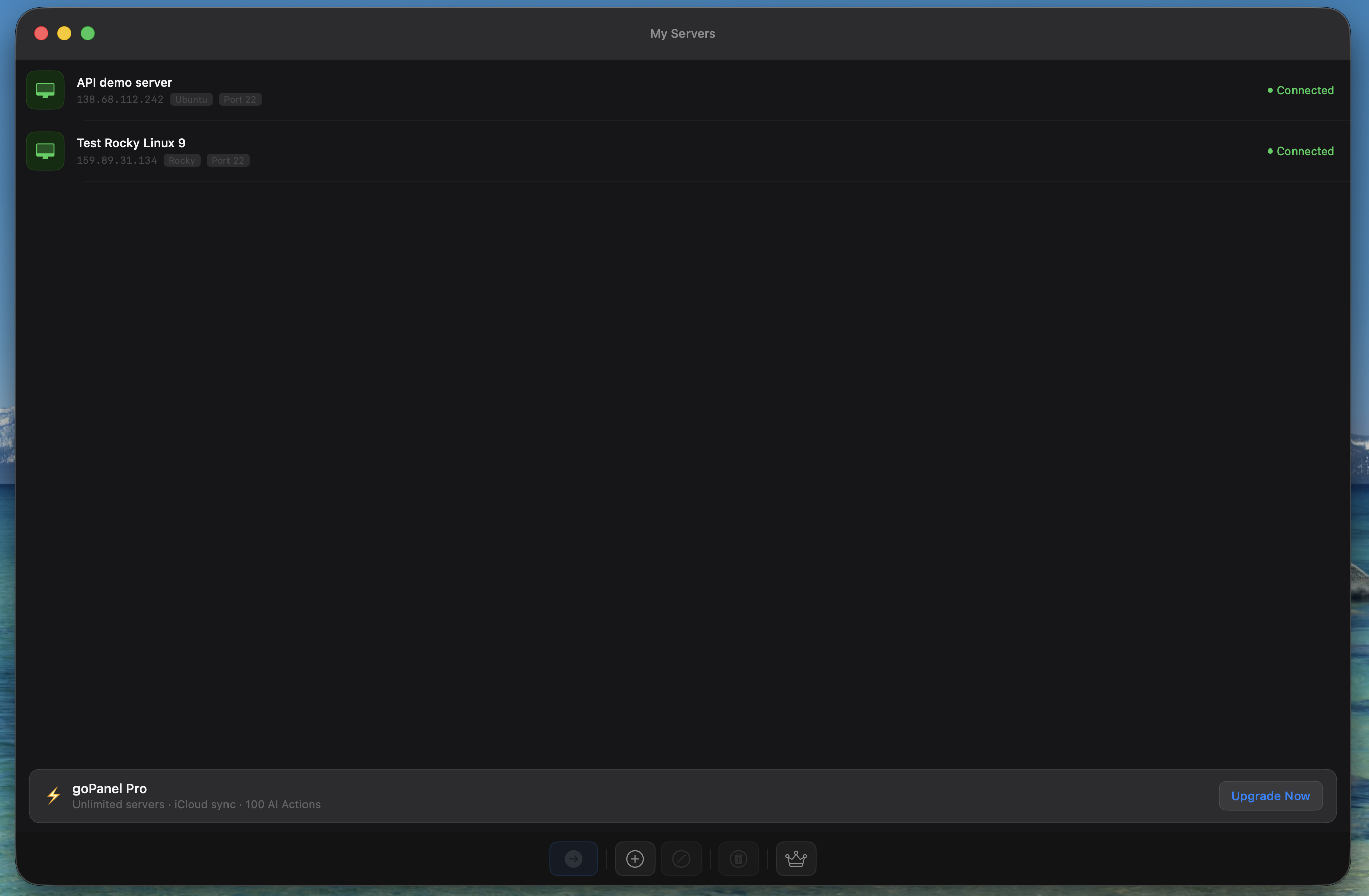
From the server list, tap the + button to add a new server. Enter your server's hostname or IP address, port (default 22), and username (default root).
Choose your authentication method:
- Password — Enter your SSH password directly.
- PEM Key — Select a
.pemprivate key file from your device. On macOS, the key is stored via a secure bookmark. On iOS, use the file picker.
Use the Test Connection button to verify SSH connectivity before saving. No connection is made until you explicitly connect.
Connecting to a Server
Select a server from your list and tap Connect (or double-click on Mac). goPanel will:
- Establish an SSH connection (10-second handshake timeout)
- Detect your operating system and Linux distribution automatically
- Deploy lightweight snapshot scripts for fast data loading (no daemons)
- Load your Dashboard with live server metrics
Dashboard
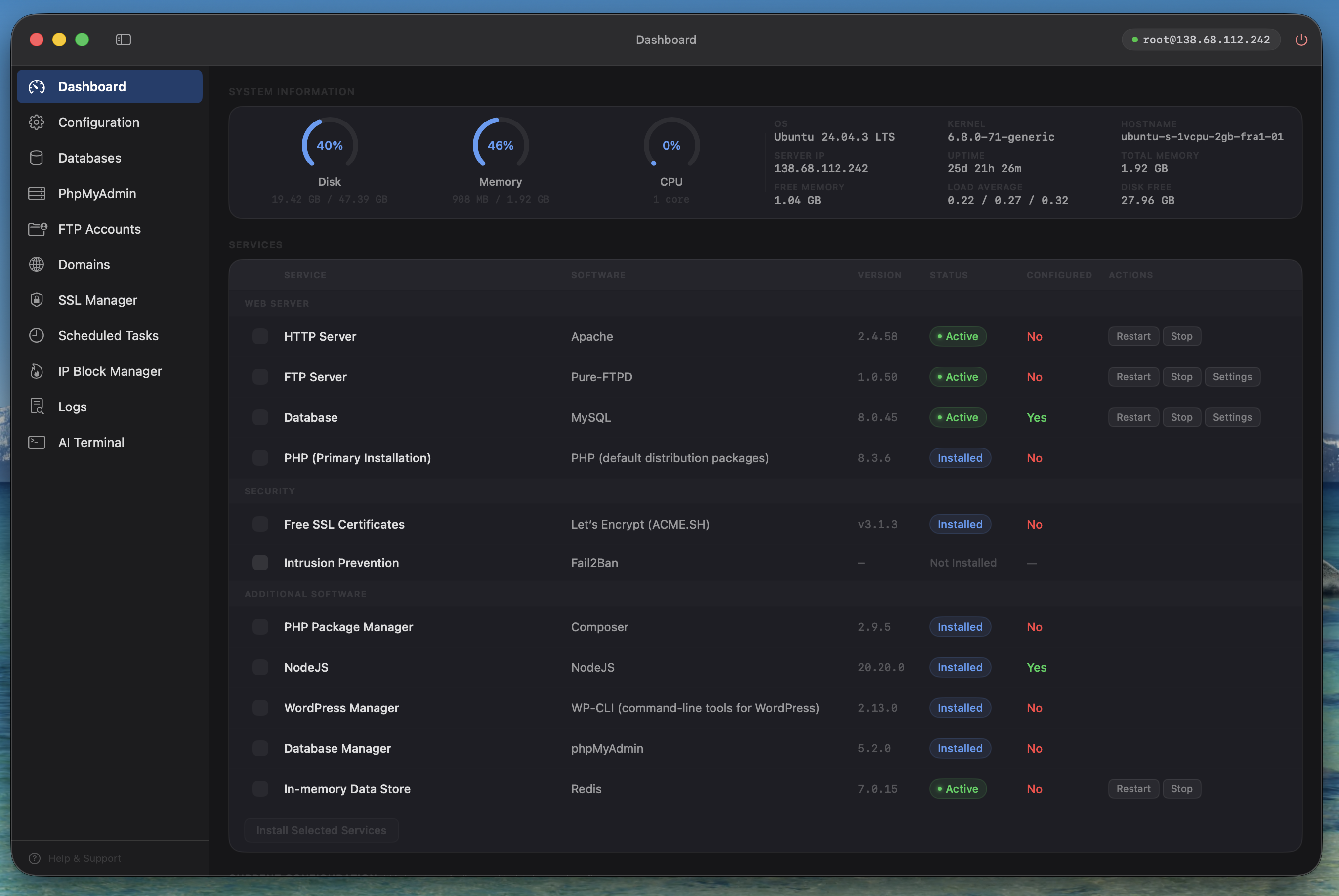
The Dashboard shows your server's current state at a glance: CPU load, memory usage, disk usage, load averages, uptime, hostname, kernel version, and IP address.
Below the metrics, you'll see your installed services with version numbers, status (Active / Stopped / Not Installed), and quick-action buttons to Restart, Stop, or configure each service.
Installing Services
For a fresh server, toggle the services you want (Apache or Nginx, MySQL or MariaDB, PHP, etc.) and tap Install Selected Services. goPanel generates a tailored installation script for your distro, uploads it, and runs it in the background. The install continues even if your SSH connection drops.
Domains
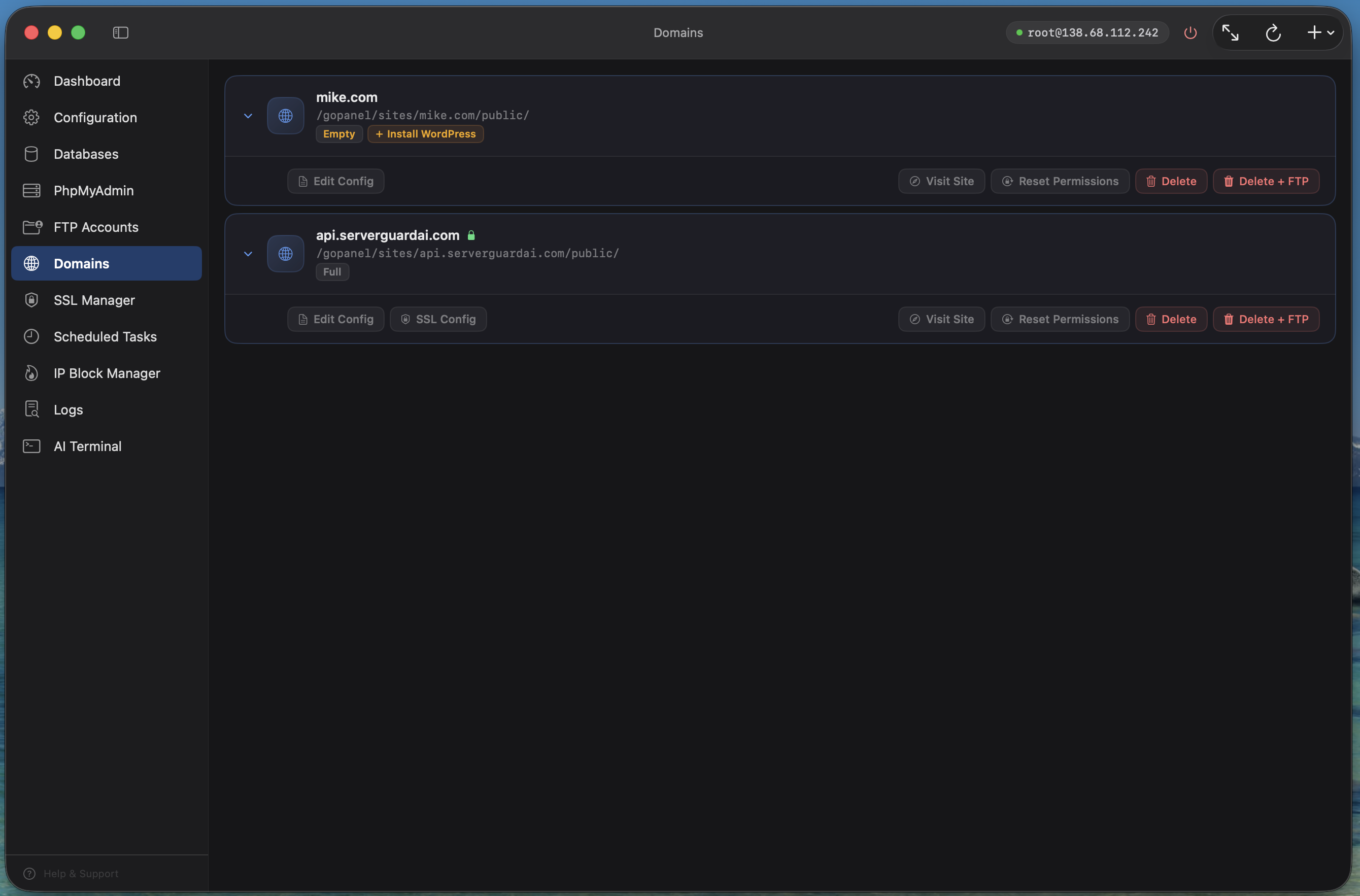
The Domains section lets you manage Apache or Nginx virtual hosts. For each domain you can:
- Add domains and subdomains with automatic vhost configuration
- Edit the Apache/Nginx configuration file with syntax-check safety
- View SSL configuration (linked to SSL Manager)
- Install WordPress with one click (automatic database + user setup)
- Switch PHP versions per domain (7.2 – 8.4)
- Reset file permissions
- Delete the domain with or without its files
SSL Certificates
goPanel uses acme.sh to issue free Let's Encrypt SSL certificates. From the SSL Manager:
- Issue a new certificate for any domain (with or without www alias)
- View certificate details: issuer, expiry date, days remaining
- Renew certificates (acme.sh handles auto-renewal via cron)
- Revoke certificates when no longer needed (Mac only)
Databases
Manage MySQL and MariaDB databases and users. The Databases section has two tabs:
- Databases — Create, delete, and view databases with size and table count. Supports domain-style names like
mike.comvia backtick quoting. - Users — Create and delete database users. Assign granular permissions (19 individual privileges) per database. Change passwords.
System databases (mysql, information_schema, performance_schema) and system users (root, debian-sys-maint) are protected from accidental deletion.
Configuration (Mac only)
On Mac, the Configuration section lets you edit raw configuration files for Apache, Nginx, MySQL/MariaDB, and PHP. Features include:
- Syntax checking before reloading services
- PHP module enable/disable toggles
- Apache module management (a2enmod/a2dismod on Debian/Ubuntu)
- Service restart, stop, and start controls
Scheduled Tasks (Cron Jobs)
Create and manage cron jobs with a visual interface. Set the schedule using dropdowns (minute, hour, day, month, weekday) and enter the command to run. No crontab syntax knowledge needed.
IP Block Manager
Block unwanted traffic by adding IP addresses to the iptables DROP list. You can block individual IPs, subnets, or IP ranges. goPanel prevents you from accidentally blocking your own IP.
Logs
Browse and view server log files including Apache/Nginx access and error logs, PHP error logs, MySQL logs, and system logs (syslog, auth.log, dmesg).
AI Terminal
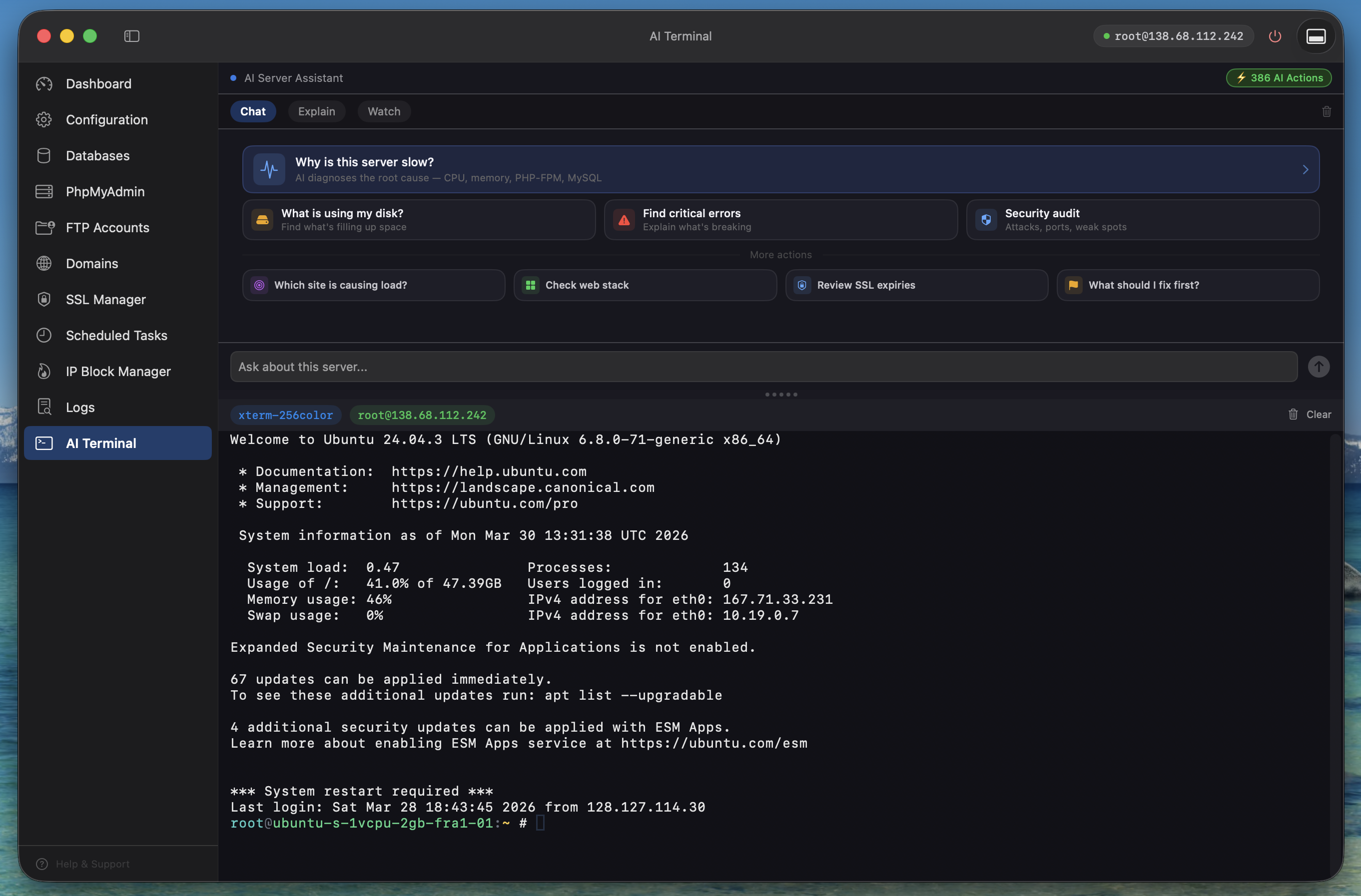
The AI Terminal is a full SSH terminal with a built-in AI assistant powered by Claude. It operates through a separate SSH session from the rest of the app, so terminal commands and app operations don't interfere with each other.
Three Modes
- Chat — Ask questions about your server. The AI reads your server's live metrics (CPU, memory, disk, services, domains) and gives contextual answers.
- Explain — When the terminal shows an error, the AI explains what went wrong and suggests fixes.
- Watch — The AI monitors your terminal output and alerts you to problems: out-of-memory events, disk full warnings, service failures, and error bursts.
Command Pills
When the AI suggests a command, it appears as a tappable "pill" with Copy and Run buttons. One tap to execute — no copy-pasting required.
AI Credits
Each AI request uses one AI credit. You get 10 free credits when you first launch the app (no signup needed). Paid plans include monthly credits (30 for Pro, 100 for Unlimited), and Lifetime Unlimited includes a one-time 100. Additional AI Action packs (100 / 250 / 500 credits) are available in-app.
phpMyAdmin
If phpMyAdmin is installed, goPanel provides quick access. On iOS, goPanel automatically whitelists your device IP before launching Safari to the phpMyAdmin URL.
iPhone and iPad
goPanel is a universal app that runs natively on iPhone and iPad.
iPhone
The iPhone interface uses a tab bar with four tabs: Dashboard, Domains, AI Terminal, and More. The More tab gives access to Databases, SSL Manager, Logs, and Help & Support.
iPad
The iPad interface uses a collapsible sidebar with access to all sections. It's very similar to the Mac experience, with full Dashboard, Domains, SSL, Databases, Cron, Firewall, and AI Terminal access.
Feature Differences
| Feature | Mac | iPad | iPhone |
|---|---|---|---|
| Dashboard & install | Yes | Yes | Yes |
| Domains & WordPress | Yes | Yes | Yes |
| SSL certificates | Issue, renew, revoke | Issue, renew | Issue, renew |
| Databases | Yes | Yes | Yes |
| Config editor | Yes | No | No |
| AI Terminal | Side-by-side | Sheet overlay | Docked bar |
| Cron jobs | Yes | Yes | No |
| Firewall | Yes | Yes | No |
| Logs | Yes | Yes | Yes |
Plans & Billing
goPanel offers a one-time Lifetime Unlimited purchase (unlimited servers, no subscription, 100 AI credits included) and three subscription tiers. All plans include the full set of management features — the difference is how many servers you can connect and how many AI credits you receive. For current prices, see the pricing page.
| Feature | Free | Pro | Unlimited | Lifetime |
|---|---|---|---|---|
| Billing | Free forever | Monthly or yearly | Monthly or yearly | One-time purchase |
| Servers | 1 | Up to 3 | Unlimited | Unlimited |
| AI credits | 10 (one-time) | 30/month | 100/month | 100 (one-time) |
| iCloud sync | No | Yes | Yes | Yes |
Subscriptions are managed through the App Store and can be cancelled at any time. When a paid subscription lapses, servers beyond the free-tier limit are locked (greyed out). You can still delete locked servers but not connect or edit them. Upgrading again unlocks them instantly.
Troubleshooting
Connection fails
Check that your server's IP address, port, and credentials are correct. Ensure your server's firewall allows SSH connections on the configured port. If using a PEM key, verify the key file is accessible.
"Unsupported operating system"
goPanel detected a Linux distribution that isn't in its supported list. The AI Terminal is still available for manual server management.
Service installation stalls
Installations run in the background via nohup and survive SSH disconnections. If you reconnect, goPanel will detect the in-progress installation and resume monitoring. If an install stalls for more than 3 minutes, you'll see a timeout warning.
Database operations fail
Verify your MySQL root password is correct in goPanel's server settings. If the password was changed outside of goPanel (e.g., via the AI Terminal), update it in the server settings.
SSL certificate issuance fails
Common causes: DNS not yet propagated to the server's IP, port 80 blocked by firewall, or Let's Encrypt rate limits. Wait a few minutes and try again.
Help & Support
Need help? Use the Help & Support option in the app sidebar to submit a bug report, feature request, or question directly to the goPanel team. Your server's configuration and recent errors are automatically included to help us diagnose issues faster.
You can also email us at contact@gopanel.io.